
How to Send CCF2 to the MRO
For Federal drug tests, copy 2 of the CCF (CCF2) must be sent to the MRO. There are two methods for uploading the CCF2. This improves legibility and decreases the likelihood of processing delays.
The CCF2 DOES NOT need to be sent to the MRO for non-DOT tests.
Uploading the CCF2
Option 1:
Using i3screens’s Secure Document Uploader
Here are the steps to follow:
- Go to https://upload.i3screen.net/
- The first time you will need to create an account which only consists of entering your email address, name, phone number, and company name.
- Each consecutive login only consists of entering your email address
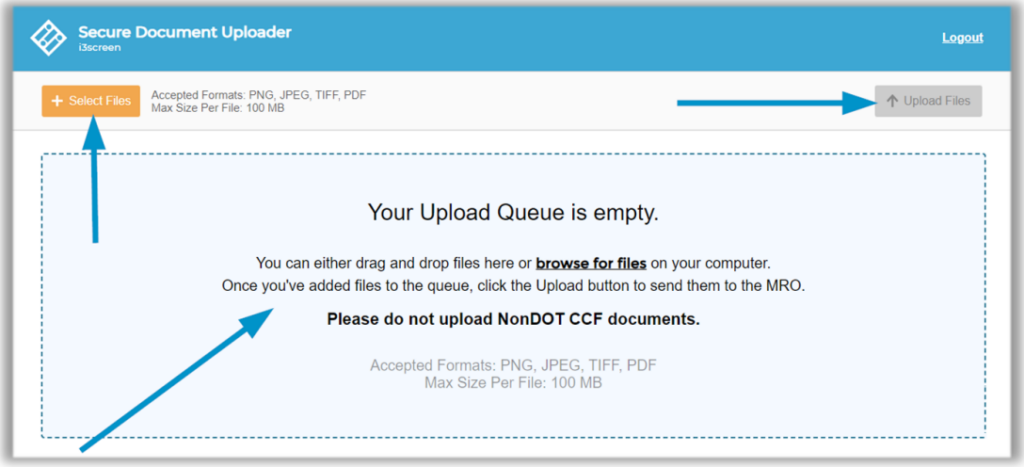
- Use either the orange + Select Files button OR drag and drop files from your computer into the blue box
- Multiple files can be uploaded at once
- Each file cannot exceed 100MB
- There are four accepted file types: PNG, JPEG, TIFF, and PDF
- Click Upload Files when you are finished
- You will receive a confirmation message when the upload is successful
Option 2:
Using TeamCME Vault to upload the CCF2 to the pending result.
Here are the steps to follow:
- Go to https://teamcmevault.com and login
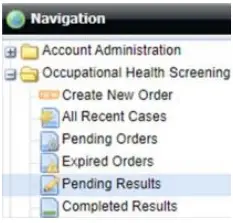
- In the top left corner, click Occupational Health Screening
- Then select Pending results
- Click on the row to highlight the case you want to assign the CCF to
- Click Upload Document at the top of the screen (See screenshot below)

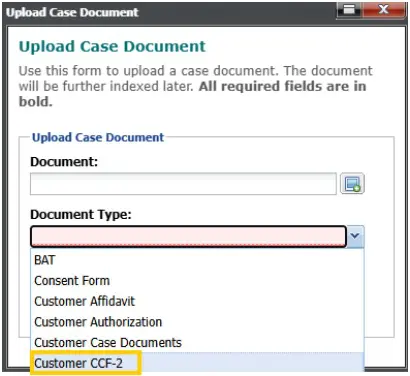
- Upload the document
- Select Customer CCF-2 (See screenshot below)
- Click Submit